What is a donor CRM? The nonprofit guide to donor relationship management
A donor CRM is a database and relationship management system built specifically for nonprofits. Learn what donor CRMs track, how they differ from general CRMs, and what to look for when choosing one.
Last updated July 2026 by Fatih
Quick answer
A donor CRM is a database for tracking supporters, their gifts, and every interaction with your organization, so staff know whom to thank, what to report, and whom to ask. A sales CRM is organized around deals; a donor CRM is organized around giving history, funds, receipts, and recurring gifts. The most useful ones fill in from your giving channels automatically instead of relying on manual gift entry.
Key takeaways
- A donor record should hold contact details, every gift with its fund, receipts sent, and notes from conversations.
- If in-person and online gifts sit in separate systems, nobody can see who gives both ways.
- Use the history to act: thank first-time givers, invite repeat givers to monthly giving, and follow up with lapsed donors.
- Givebear's CRM records kiosk, online, event, and recurring gifts automatically, and staff can log cash and checks by hand.
Who this is for: Small nonprofits and congregations still tracking donors in a spreadsheet; Development staff who need lists for appeals and thank-you calls; Finance teams producing year-end giving statements
A donor CRM is the database a nonprofit keeps on the people who give to it: who they are, what they gave, when, to which fund, by which channel, and how the organization has been in touch. It is the nonprofit version of a customer relationship management system.
Its value is the questions it answers. Who gave last year but not this year? Which monthly donors have never heard from us since signing up? Which event guests have never given directly? A spreadsheet holds the same names; a CRM makes those lists in a minute.
How does a donor CRM differ from a general-purpose CRM?
A sales CRM moves a contact through stages toward a closed deal. A donor relationship has no close: someone who gave $500 three years ago may be the best person to ask for a major gift today.
So a donor CRM is organized around giving history: totals over time, first and latest gift, lapsed or active, recurring or not, and the receipts and statements tax law requires. A good one fills itself from the giving channels instead of waiting for an import.
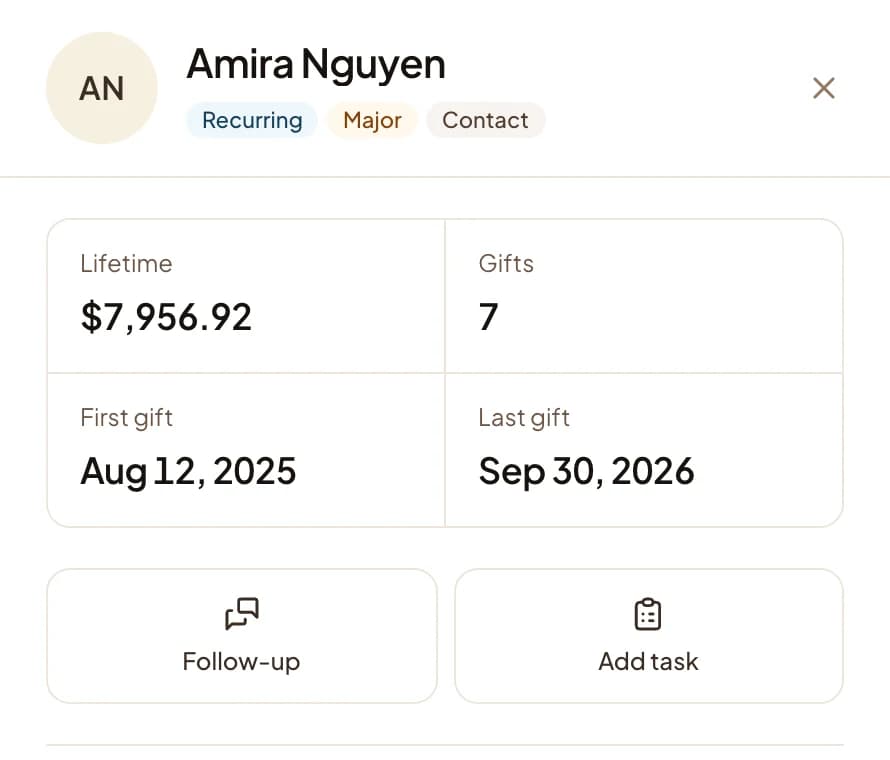
What should a donor record contain?
Contact details; every gift with date, amount, fund, channel, and payment method; any recurring gift and its schedule; emails and messages sent; events attended; and notes from staff.
The usual gap is not a missing field but a missing channel: kiosk gifts in one system, online gifts in another, checks in a spreadsheet. Until those are in one record, nobody can see a donor's whole relationship with the organization.
Using donor data to drive giving upgrades
An upgrade ask goes to someone already giving, so it starts warm. A donor who gave $250, then $300, then $300 is a good candidate for $500; a $25 monthly donor who has not changed in 18 months might go to $35.
Upgrade lists are only as good as the data. Duplicate records and gifts on the wrong fund produce awkward asks, so merge duplicates before you build the list.
How does a donor CRM handle in-person kiosk giving?
A kiosk gift with an email either matches an existing donor or creates a new one. Givebear's kiosk looks up the email as the donor types and greets a returning donor by first name, which also keeps the gift on the right record.
Because the kiosk writes straight into the donor records, a new donor from Sunday morning can get a personal thank-you on Monday, not after the next import.
Practical use cases
- List donors who gave 12 to 24 months ago and nothing since, for a reactivation appeal.
- Find the monthly donors who have never been thanked personally.
- Show the board giving by fund over the last three years.
- Send year-end statements to every donor without assembling them by hand.
Key features
- Gift history per donor across kiosk, online, event, and manual entries
- Fund on every gift
- Recurring gift status
- Tags, notes, and duplicate merge
- CSV import and export
- Annual giving statements
Common questions
What does a donor CRM cost for a small nonprofit?
Can a donor CRM connect kiosk and online giving records?
How do I migrate donor data from a spreadsheet to a CRM?
What reports should a donor CRM produce automatically?
More in Glossary
See it with your own funds.
Book a 30-minute walkthrough. No slides and no hard sell: we set Givebear up around how your organization already gives.
- Your funds, set up the way your treasurer reports them
- Where a kiosk would go, and what it costs
- The reports your board will actually see
Rather set it up yourself? Start free
Loading available times
Or open the booking page